
Summer Sale
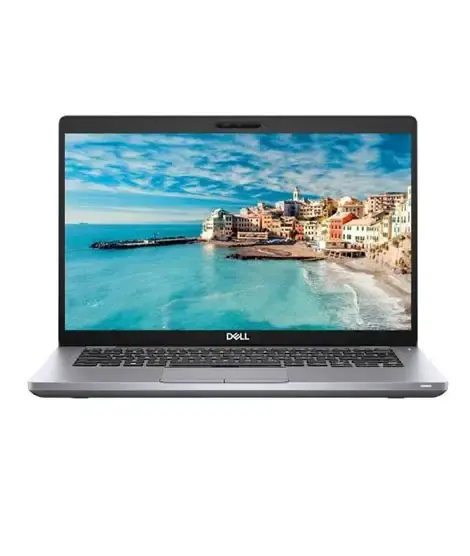
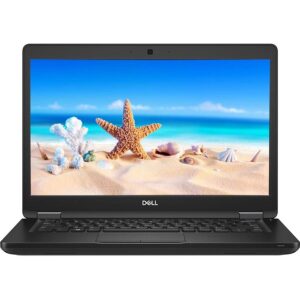
Dell Latitude 5421 i7 11th 16GB With NVidia MX450 2GB
Original price was: ₨ 136,000.₨ 129,000Current price is: ₨ 129,000.
Installment CalculatorBuy Now Pay Later
Dell Latitude 5421 i7 11th 16GB 256GB SSD With NVidia MX450 2GB Laptop
he Dell Latitude 5421 Core i7 11th Generation laptop is a performance-oriented business laptop for professionals who need more processing power than a standard office machine. Equipped with the Intel Core i7-11850H processor, 16GB DDR4 RAM, a 256GB NVMe SSD, and dedicated NVIDIA GeForce MX450 2GB graphics, it is suitable for demanding multitasking, business applications, programming, and selected creative workloads.
Its 14-inch Full HD IPS display, Windows 11 Pro, backlit keyboard, and Thunderbolt connectivity make the Dell Latitude 5421 a practical choice for office professionals, developers, freelancers, and users looking for a capable laptop in Lahore.
Performance That Goes Beyond Everyday Office Work
Intel Core i7-11850H with 8 Cores and 16 Threads
At the heart of the Dell Latitude 5421 is the Intel Core i7-11850H, an 11th Generation H-series processor with eight cores, 16 threads, 24MB cache, and a listed maximum turbo frequency of 4.8GHz.
Unlike lower-power processors designed primarily for basic computing, this H-series chip is built for heavier workloads. It can handle complex spreadsheets, multiple business applications, software development environments, large browser sessions, and demanding productivity tasks.
For users who work with databases, code editors, virtual development environments, or resource-intensive business software, the processor provides a useful performance advantage. Actual sustained performance depends on cooling, power settings, and the condition of the individual laptop.
NVIDIA MX450 2GB Dedicated Graphics
The dedicated NVIDIA GeForce MX450 with 2GB graphics memory gives this configuration an advantage over laptops that rely exclusively on integrated graphics.
It can assist with supported creative applications, lighter graphics workloads, photo editing, and some older or less demanding games. Performance varies considerably by software, settings, and driver support.
The MX450 is an entry-level dedicated GPU, not a high-end gaming or professional rendering graphics card. If your primary requirement is modern AAA gaming, advanced 3D rendering, or intensive GPU-based video effects, compare this laptop with models featuring more powerful dedicated graphics.
16GB DDR4 RAM for Heavy Multitasking
The installed 16GB DDR4 memory is suitable for running multiple applications without constantly closing programs to free up memory. It supports typical combinations of office software, browser tabs, communication tools, development environments, and light creative applications.
The listed maximum RAM capacity is 64GB. This gives the model potential for future memory expansion, although the actual upgrade path should be verified against the installed memory configuration and specific unit.
256GB NVMe SSD for Responsive Computing
The 256GB NVMe SSD provides faster system startup, application loading, and file access than a traditional mechanical hard drive. It is a good starting capacity for Windows, productivity software, and essential work files.
However, users who install large development tools, professional applications, or multiple games may need additional storage. Check the drive’s health and compatibility before planning an upgrade.
14-Inch Full HD IPS Display for Work and Mobility
The 1920 × 1080 Full HD IPS display provides a detailed workspace for spreadsheets, documents, presentations, programming, and video meetings. Its 14-inch size offers a balance between screen space and portability.
For design and content work, Full HD resolution is useful for everyday layouts and image editing. Users who require precise colour reproduction should check the panel’s colour coverage and brightness rather than assuming all IPS displays have identical colour performance.
Thunderbolt Connectivity for a Flexible Workstation
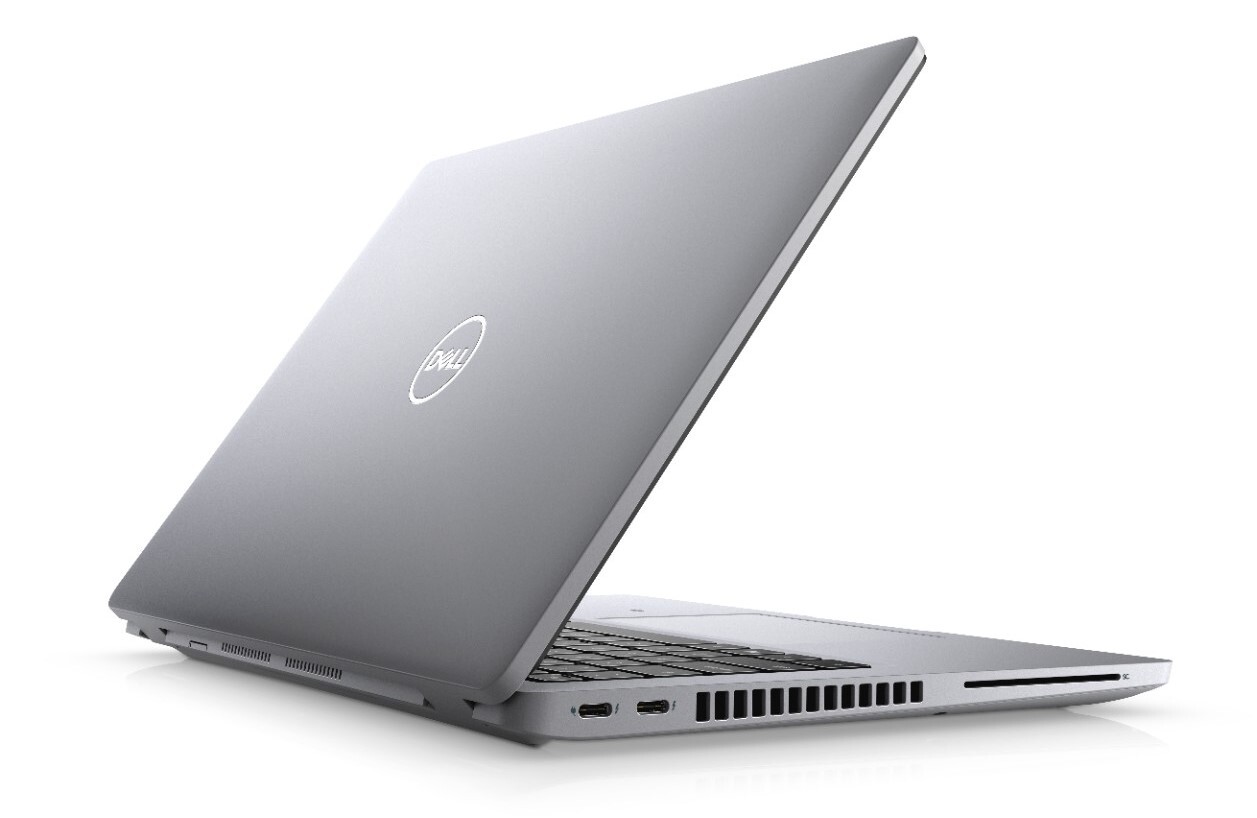
The Dell Latitude 5421 includes two Thunderbolt 4-capable USB Type-C connections as listed in the supplied specification, along with two SuperSpeed USB 3.2 ports and HDMI.
These connections can support compatible external displays, high-speed storage, docking stations, and other peripherals. Thunderbolt and USB-C capabilities depend on the specific device and accessory, so verify dock, display, and charging compatibility before purchasing.
Additional connectivity includes Wi-Fi, Bluetooth, LAN, and an HD webcam, making the laptop suitable for office networks, video conferencing, and hybrid work environments.
Who Should Consider the Dell Latitude 5421?
- Professionals running multiple business applications and large spreadsheets.
- Programmers and developers working with code editors, databases, and development tools.
- Freelancers handling website management, content production, and general digital work.
- Designers who need dedicated graphics for light to moderate creative tasks.
- Business users who want Windows 11 Pro and modern external-display connectivity.
- Users who need more processing capacity than a typical low-power laptop provides.
For demanding gaming, advanced 3D work, or professional GPU-heavy rendering, consider a laptop with a stronger graphics processor. The MX450’s 2GB dedicated memory is an important limitation for newer graphics-intensive applications.
Why Buy from Hanif Centre Electronics?
Choosing the right laptop means matching the hardware to your workload, not just choosing the highest processor label. Hanif Centre Electronics offers computing products for students, professionals, freelancers, and businesses.
If you are comparing the Dell Latitude 5421 price in Lahore, check the exact configuration before purchasing, particularly the installed RAM, NVIDIA graphics, SSD capacity, and operating system.
Dell Latitude 5421 Full Specifications
| Specification | Details |
|---|---|
| Brand | Dell |
| Series | Latitude |
| Model | Latitude 5421 |
| Operating System | Windows 11 Pro |
| Warranty | 15-day check warranty |
| Processor | Intel Core i7-11850H |
| Generation | 11th Generation |
| Processor Cores | 8 cores |
| Processor Threads | 16 threads |
| Base Frequency | 2.5GHz, as listed |
| Maximum Turbo Frequency | Up to 4.8GHz |
| Processor Cache | 24MB |
| Screen Size | 14 inches |
| Display Resolution | 1920 × 1080 Full HD IPS |
| Installed RAM | 16GB DDR4 |
| Maximum RAM | Up to 64GB, as listed |
| Storage | 256GB NVMe SSD |
| Integrated Graphics | Intel graphics; verify exact configuration |
| Dedicated Graphics | NVIDIA GeForce MX450 |
| Dedicated Graphics Memory | 2GB |
| Wi-Fi | Yes |
| Bluetooth | Yes |
| LAN | Yes |
| Webcam | HD webcam |
| HDMI | Yes |
| SuperSpeed USB 3.2 | 2 ports |
| USB Type-C | 2 Thunderbolt ports, as listed |
| Backlit Keyboard | Yes |
| Fingerprint Reader | No, as listed |
Frequently Asked Questions
1. What is the Dell Latitude 5421 i7 11th Gen price in Pakistan?
The price depends on stock availability, physical condition, battery health, and the exact configuration. Contact Hanif Centre Electronics for the current price in Lahore and confirmation that the available unit includes the NVIDIA MX450 2GB graphics card.
2. Is the Intel Core i7-11850H good for multitasking?
Yes. Its eight cores and 16 threads make it suitable for demanding productivity, software development, large spreadsheets, and running multiple applications. Actual performance depends on cooling, power limits, and the software being used.
3. Can the Dell Latitude 5421 run games with NVIDIA MX450 2GB?
It can run some older games and less demanding titles, depending on resolution and graphics settings. However, its 2GB graphics memory and entry-level GPU performance limit its suitability for modern, graphics-intensive games.
4. Is the Dell Latitude 5421 suitable for graphic design?
It can handle many everyday design tasks, including basic Photoshop work, image adjustments, and lighter creative projects. For complex 3D scenes, advanced effects, or demanding professional workflows, a laptop with a more powerful GPU is a better choice.
5. Can I upgrade the RAM and SSD?
The supplied specifications list support for up to 64GB RAM. Storage upgrade options depend on the exact configuration and compatible drive. Confirm the installed memory arrangement, available slots, SSD form factor, and service requirements before buying components.
6. What is the benefit of Thunderbolt connectivity?
Compatible Thunderbolt connections can provide high-speed data transfer and support external displays and docking stations. This can help turn the laptop into a desktop-style workstation with additional monitors, peripherals, and compatible external storage.
7. Is the Dell Latitude 5421 suitable for programming?
Yes. The Core i7-11850H, 16GB RAM, and NVMe SSD provide a useful foundation for programming, IDEs, database tools, web development, and general software engineering. More demanding virtual machines and large development environments may benefit from additional RAM and storage.
Only logged in customers who have purchased this product may leave a review.
Related products
-
USED/REFURB
DELL LATITUDE 7480 i5 7th 8GB 256GB SSD 14″
₨ 60,000Dell Latitude 7480 Core i5 7th Specifications
Brand Dell Series Dell Latitude Model Dell Latitude 7480 Processor Core i5 Generation 7th Gen Ram 8 GB SSD 256 GB Graphics Intel Screen Size 14 Inch Types of Graphics Memory Shared Operating System Window 10 Bluetooth Yes Wifi Yes USB Yes Webcame Yes -
USED/REFURB
LENOVO THINKBOOK YOGA L13 I5 10TH 8GB 256GB
₨ 77,000Specifications Brand Lenovo Generation 10th Generation Processor Type Intel Core i5 1035G7 QuadCore (8-MB SmartCache) Processor Speed 2.4 GHz Turbo Boost 4.2 GHz (4 Cores – 8 Threads) Installed RAM 8 GB Type of memory 8 GB DDR4 3200MHz (Soldered) Hard drive size 256 GB SSD Hard drive speed 256 GB PCIe SSD Optical Drive No Type of optical drive – SSD 256 GB SSD Type of harddrive PCIe SSD Dedicated graphics No Graphics memory Integrated Intel® Iris® Xe Graphics Type of graphics memory Shared Switchable graphics No Graphics processor Intel Backlight LED Screen size 13.3″ FHD (1920 x 1080) IPS, anti-reflective, anti-smudge, touchscreen, 300 nits Screen surface 13.3″ FHD (1920 x 1080) IPS, anti-reflective, anti-smudge, touchscreen, 300 nits Screen resolution 1920×1080 Touchscreen Yes Color Black RAM 8 GB Operating System Windows 10 Home Weight 1.43kg / 3.17lbs with aluminum top cover Fingerprint Reader Yes Numeric keyboard No Backlit keyboard Yes Bluetooth Bluetooth 5.1 LAN No Speed – Wireless/Wifi Yes Type Intel® AX201 WiFi 6 802.11AX (2 x 2) Condition Used Imported USB 2 x USB 3.2 Gen 1 Type-A (one always on) USB 3.2 Gen 2 Type-C USB 4.0 Type-C / Thunderbolt™ 4 HDMI HDMI 2.0 Camera 720p HD with webcam privacy cover Operating system (Primary) Windows 10 Pro -
USED/REFURB
DELL LATITUDE 5480 i5 7th 8GB 256GB SSD 14″
₨ 57,000Dell Latitude 5480 Core i5 Specifications
Brand Dell Series Dell. Latitude Model Latitude E5480 OS Version Windows 10 Processor Core i5 7th Generation Processor Speed 7300U Core i5 2.6GHz upto 3.6GHz Processor Cache 3 MB Screen Size 14 inch Screen Resolution 1920*1080 Full HD IPS Display Ram 8 GB Ram Type DDR4 Max Ram 32GB SSD 512GB M.2 Graphics Card Integrated Graphics Graphics Card Details Intel HD Graphics 620 Graphics Card Memory System Shared Lan Yes Wifi Yes , N Series Webcam Yes, HD Cam Backlit Keyboard Yes Spill Resistant Yes USB 3 3 Ports USB Type C 1 Port HDMI Yes -
USED/REFURB
Dell Latitude 7300 i7 8th 16GB 256GB SSD
Original price was: ₨ 91,000.₨ 84,000Current price is: ₨ 84,000. -
USED/REFURB
HP MT45 AMD A8 THIN CLINT NOTEBOOK 8GB 256GB SSD 14″
₨ 50,000Laptop type Traditional Laptops Ram type DDR3 Generation Other Graphic card type — Graphic card memory No Screen size 14.10 Resolution — touch screen No Camera type — Keyboard — Finger print — Speaker — Battery — Screen type — backlit No Graphic card name — Brand HP Model Elitebook MT42- AMD PRO A8 8600B- 8GB RAM- 256GB SSD+500GB HDD Storage ssd 256 Storage hdd 500 Ram 8 Processor AMD A8 PRO -
USED/REFURB
DELL LATITUDE 5490 i5 8th 8GB 256GB SSD 14″
₨ 60,000Specifications Processor Core i5-8250u QuadCore Processor (4 Cores – 8 Threads) 8th Generation 1.6 GHz Turbo Boost 3.4 (6 MB Cache) Memory 8GB Ram DDR4 Storage 256GB SSD M.2 SATA Display 14.0″ FHD WVA Anti-glare (16:9) WLED, 220 nits, Carbon Fiber Reinforced Polymer LCD Back Graphics Intel® UHD Graphics 620 Operating System Windows 10 Color Black

Reviews
There are no reviews yet.