
Summer Sale
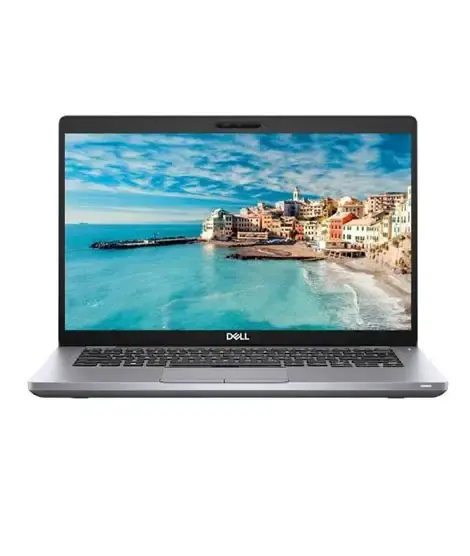
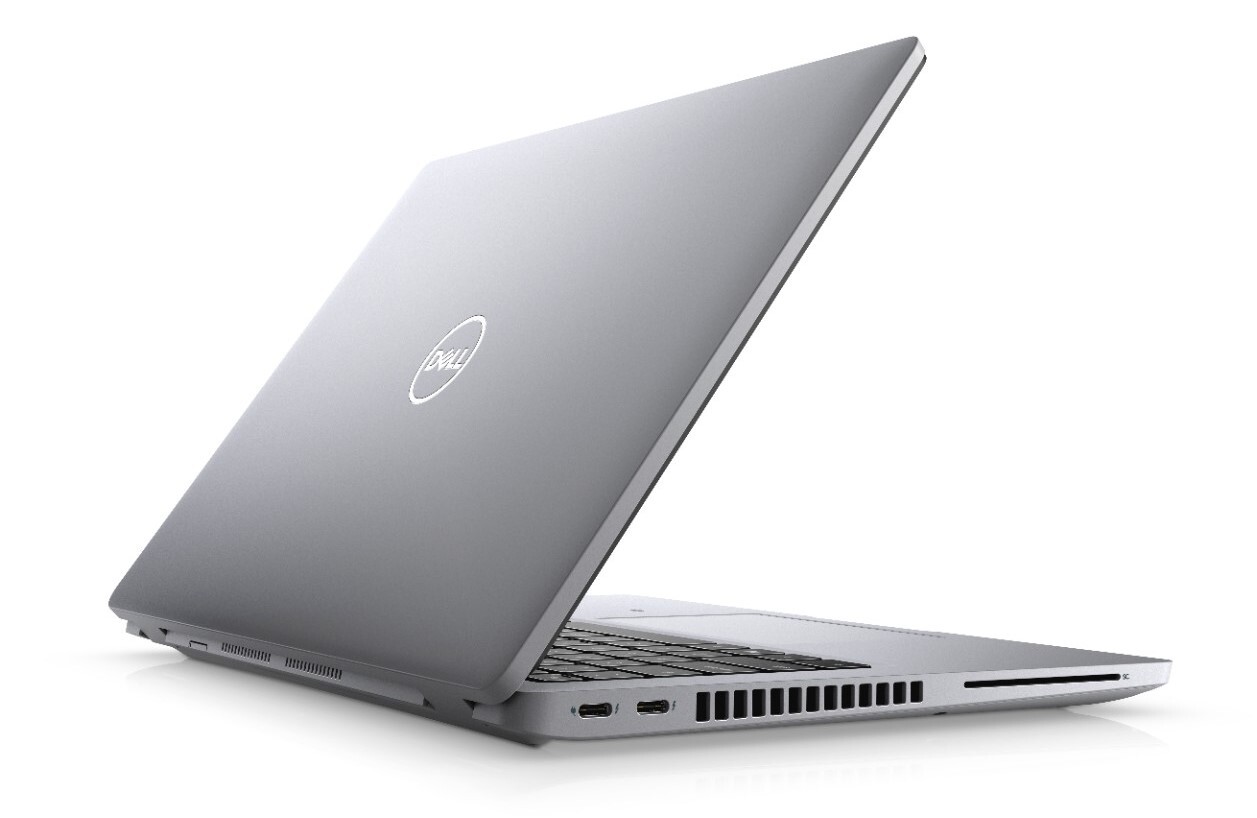
Dell Latitude 5420 i5 11th 16GB 256GB SSD
Original price was: ₨ 88,000.₨ 86,000Current price is: ₨ 86,000.
Installment CalculatorBuy Now Pay Later
Dell Latitude 5420 i5 11th 16GB 256GB SSD Laptop
The Dell Latitude 5420 i5 11th Generation laptop is a business-class laptop designed for office work, online meetings, university assignments, web browsing, and everyday multitasking. It features an Intel Core i5-1145G7 processor, 16GB DDR4 RAM, a 256GB NVMe SSD, and a 14-inch Full HD IPS display. With Intel Iris Xe integrated graphics, Windows 11 Pro, Thunderbolt connectivity, and a backlit keyboard, this Dell Latitude laptop is a practical choice for professionals, students, and business users looking for dependable everyday performance.
Dell Latitude 5420 i5 11th Gen – Performance and Features
Intel Core i5-1145G7 Processor
The Dell Latitude 5420 is equipped with an 11th Generation Intel Core i5-1145G7 processor featuring four cores, a base frequency of 2.6GHz, Turbo Boost speeds of up to 4.4GHz, and 8MB cache. This processor is suitable for handling office applications, spreadsheets, browser tabs, video calls, online learning, and routine business workloads.
16GB DDR4 RAM for Multitasking
With 16GB DDR4 memory, this laptop can handle multiple applications and browser tabs more comfortably than a typical 8GB configuration. It is suitable for everyday productivity, administrative work, website management, and general business multitasking. The memory is expandable up to 64GB according to the supplied specifications, subject to the installed memory configuration.
256GB NVMe SSD for Faster Everyday Use
The 256GB NVMe SSD helps Windows start quickly and improves application loading and file access compared with a traditional mechanical hard drive. It offers practical storage for essential software, documents, presentations, and work files. Users who keep large video files or extensive project libraries may benefit from additional storage.
14-Inch Full HD IPS Display
The 14-inch display has a 1920 × 1080 Full HD resolution and IPS technology. It provides a useful balance between screen clarity and portability for reading documents, editing spreadsheets, managing online stores, attending virtual meetings, and working with multiple applications.
Intel Iris Xe Integrated Graphics
Intel Iris Xe integrated graphics support everyday visual tasks, video playback, office applications, and light photo editing. Graphics performance can depend on the installed memory configuration and system settings. This laptop is not intended to replace a dedicated-GPU workstation for demanding 3D rendering or high-end gaming.
Thunderbolt and Essential Connectivity
The Dell Latitude 5420 offers practical connectivity for modern workspaces, including two USB Type-C Thunderbolt ports with Power Delivery and DisplayPort support, two USB 3.2 ports, HDMI, LAN, Wi-Fi, Bluetooth, and an HD webcam. These connections make it easier to attach compatible external displays, accessories, wired networks, and docking solutions.
Windows 11 Pro and Backlit Keyboard
Windows 11 Pro provides a familiar environment for productivity and business applications. The backlit keyboard is useful when working in dimly lit rooms or during evening study sessions. The supplied specifications indicate that this configuration does not include a fingerprint reader.
Why Buy from Hanif Centre Electronics?
When choosing a Dell Latitude 5420 in Lahore, compare the price, exact processor model, RAM and SSD configuration, display condition, battery health, and warranty terms before purchasing. Hanif Centre Electronics helps customers evaluate laptop specifications and choose a configuration that matches their work requirements and budget.
Dell Latitude 5420 Specifications
| Specification | Details |
|---|---|
| Brand | Dell |
| Series | Latitude |
| Model | Latitude 5420 |
| Operating System | Windows 11 Pro |
| Processor | Intel Core i5-1145G7, 11th Generation |
| Processor Cores | 4 cores |
| Base Frequency | 2.6GHz |
| Maximum Turbo Frequency | Up to 4.4GHz |
| Processor Cache | 8MB |
| Display Size | 14 inches |
| Display Resolution | 1920 × 1080 Full HD |
| Display Technology | IPS |
| RAM | 16GB DDR4 |
| Maximum RAM | Up to 64GB, as specified |
| Storage | 256GB NVMe SSD |
| Graphics | Intel Iris Xe integrated graphics |
| Graphics Memory | Shared system memory |
| Wi-Fi | Yes |
| Bluetooth | Yes |
| Ethernet LAN | Yes |
| Webcam | HD webcam |
| HDMI | Yes |
| USB 3.2 | 2 ports |
| USB Type-C | 2 Thunderbolt ports with Power Delivery and DisplayPort |
| Backlit Keyboard | Yes |
| Fingerprint Reader | No |
| Warranty | 15-day check warranty |
Frequently Asked Questions
1. What is the price of the Dell Latitude 5420 i5 11th Gen in Pakistan?
The price of the Dell Latitude 5420 i5 11th Generation with 16GB RAM and a 256GB SSD depends on its condition, battery health, display condition, included accessories, and seller warranty. Check the current listing at Hanif Centre Electronics for the latest price and availability in Lahore.
2. Is the Dell Latitude 5420 with 16GB RAM good for multitasking?
Yes. Its 16GB DDR4 RAM and four-core Intel Core i5-1145G7 processor are suitable for everyday multitasking, including office applications, research, multiple browser tabs, online meetings, and routine website management.
3. Can the Dell Latitude 5420 run Windows 11 Pro?
Yes. The supplied configuration lists Windows 11 Pro. This operating system supports compatible productivity software, business applications, and everyday computing tasks.
4. Is the Dell Latitude 5420 suitable for graphic design and Photoshop?
It can handle light to moderate graphic design work, image editing, and design applications that are compatible with its processor and integrated graphics. For complex Photoshop projects, heavy effects, demanding video editing, or 3D work, a laptop with stronger dedicated graphics may be a better choice.
5. Can I connect two external monitors to the Dell Latitude 5420?
The laptop’s two Thunderbolt USB-C ports support DisplayPort, and HDMI provides another display connection. Multiple external monitors may be possible with compatible monitors, adapters, or a docking station. The supported display arrangement and resolutions depend on the laptop’s graphics capabilities and the connection setup.
6. Is a 256GB SSD enough for office work and university?
A 256GB NVMe SSD is generally sufficient for Windows, productivity applications, documents, presentations, and routine university or office tasks. If you store large media files or install many large applications, consider whether you will need additional storage.
Only logged in customers who have purchased this product may leave a review.
Related products
-
USED/REFURB
HP ELITEBOOK 840 G5 I5 8TH 8GB 256GB SSD 14″
₨ 78,000Brand HP Series HP. EliteBook Model Elitebook 840 G5 OS Version Windows 10 Pro Processor Core i5 8th Generation Processor Speed 7650U Core i7 1.9GHz With Turbo Boost 4.2GHz 4 Cores 8 Threads Processor Cache 8 MB Ram 8GB Ram Type DDR4 Max Ram 32GB SSD 256GB SSD Screen Size 14 inch Screen Resolution 1920*1080 Full HD IPS Display Graphics Card Integrated Graphics Graphics Card Details Intel® UHD Graphics 620 Graphics Card Memory System Shared Finger Print Reader Yes Backlit Keyboard Yes Bluetooth Yes Lan Yes Wifi Yes HDMI Yes Webcam Yes USB3.1 2 Ports USB Type C 1 Port (Thunderbolt™ 3) -
USED/REFURB
DELL LATITUDE 5590 i5 8th 8GB 256GB SSD 15.6″
₨ 65,000Specifications Brand Dell Generation 8th Generation Processor Type 8th Generation Core i5-8250u QuadCore Processor (4 Cores – 8 Threads) Processor Speed 1.6 GHz Turbo Boost 3.4 (6 MB Cache) Installed RAM 08 GB Type of memory DDR4 Hard drive size 256 GB SSD Hard drive speed – Optical Drive No Type of optical drive – SSD 256 GB SSD Type of harddrive SATA Dedicated graphics No Graphics memory Intel UHD 620 Type of graphics memory Shared Switchable graphics No Graphics processor Intel Backlight LED Screen size 15.6″ FHD WVA (1920 x 1080) Anti-glare (16:9) WLED, 220 nits, Carbon Fiber Reinforced Polymer LCD Back Screen surface 15.6″ FHD WVA (1920 x 1080) Anti-glare (16:9) WLED, 220 nits, Carbon Fiber Reinforced Polymer LCD Back Screen resolution 1920×1080 Touchscreen No Color Black RAM 8 GB Operating System DOS Weight 1.88 KG Fingerprint Reader No Numeric keyboard Yes Backlit keyboard Yes Bluetooth Yes LAN Yes Speed – Wireless/Wifi Yes Type – Condition Used USB Yes HDMI Yes Camera Yes Operating system (Primary) DOS -
USED/REFURB
LENOVO THINKPAD T480 I5 8TH 8GB 256GB
₨ 64,000Specifications Brand Lenovo Generation 8th Generation Processor Type 8th Generation Core i5 8350u Processor Processor Speed 1.7 GHz Max Turbo Boost Frequency 3.6 GHz (6 MB Cache) Installed RAM 8GB Type of memory DDR4 Hard drive size 256GB Hard drive speed Solid State Drive Optical Drive No Type of optical drive – SSD 256 GB SSD Type of harddrive Solid State Drive Graphic Series Intel UHD Graphics Dedicated graphics No Graphics memory Intel UHD 620 GC Type of graphics memory Shared Switchable graphics No Graphics processor Intel Backlight LED Screen size 14″ Inch Full HD 1080p LED Antiglare Display Screen resolution 1920 x 1080 Screen surface 14″ Inch Full HD 1080p LED Antiglare Display Touchscreen No Color Black RAM 8 GB Weight 1.5 KG Fingerprint Reader No Backlit keyboard Yes Numeric keyboard No Bluetooth Yes LAN Yes Speed – Wireless/Wifi Yes Type – Condition Used HDMI Yes Camera Yes Operating System Windows 10 Home -
USED/REFURB
DELL LATITUDE 7480 i5 7th 8GB 256GB SSD 14″
₨ 60,000Dell Latitude 7480 Core i5 7th Specifications
Brand Dell Series Dell Latitude Model Dell Latitude 7480 Processor Core i5 Generation 7th Gen Ram 8 GB SSD 256 GB Graphics Intel Screen Size 14 Inch Types of Graphics Memory Shared Operating System Window 10 Bluetooth Yes Wifi Yes USB Yes Webcame Yes -
USED/REFURB
HP ELITEBOOK 640 G4 I5 8TH 8GB 256GB SSD 14″
₨ 68,000Key Specifications
- Processor: Intel Core i5 (8th Generation)
- RAM: 8GB DDR4
- Storage: 256GB SSD
- Display: 14” Full HD (1920 x 1080)
- Condition: Used (Certified and tested for performance)
-
USED/REFURB
HP ELITEBOOK 430 G5 I5 8TH 8GB 256GB SSD 13.3″
₨ 61,000Details
Intel Core i5 8th Gen/8GB/256GB SSD/13.3″ FHD LED/Win 11 Pro
Brand HP Series HP. ProBook Model Probook 430 G5 OS Version Windows 11 Pro Processor Core i5 8th Generation Processor Speed 8250U Core i5 1.6GHz upto 3.4GHz Processor Cache 6 MB Ram 8 GB Ram Type DDR4 Max Ram 32GB SSD 256GB Hard Disk Optional upto 2TB Optical Drive No Optical Drive Screen Size 13.3 inch Screen Resolution 1920*1080 Full HD IPS Display Graphics Card Integrated Graphics Graphics Card Details Intel® UHD Graphics 620 Graphics Card Memory System Shared Finger Print Reader Yes Backlit Keyboard No Bluetooth Yes Lan Yes Wifi Yes HDMI Yes VGA Port Yes Webcam Yes, HD Cam USB3.1 2 Ports USB Type C 1 Port

Reviews
There are no reviews yet.